
SudokuWiki.org
Strategies for Popular Number Puzzles
Sudoku Solver for Android
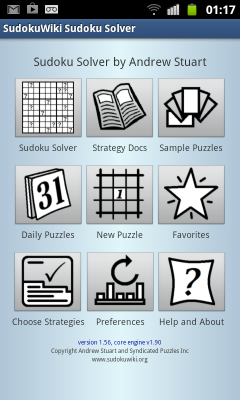
Welcome to the project page for the SudokuWiki Solver, an App for Android.
Update 26th of March: So it looks like my release of version 1.84 in October 2023 never made it to the Google Play Store - some irrelevant regulatory tick boxes needed to be ticked and I didn't hear about them. So everyone was still on v1.82 which was for a pretty old version of Android and now I'm getting feedback saying the app isn't compatible. Today I have released 1.85 but it is "in review" for up to seven days. Contains all the new stuff from the last six months. Hopefully fix all the problems and the reviews that say it is 'abandonware'. Certainly isn't!
Update 26th of March: So it looks like my release of version 1.84 in October 2023 never made it to the Google Play Store - some irrelevant regulatory tick boxes needed to be ticked and I didn't hear about them. So everyone was still on v1.82 which was for a pretty old version of Android and now I'm getting feedback saying the app isn't compatible. Today I have released 1.85 but it is "in review" for up to seven days. Contains all the new stuff from the last six months. Hopefully fix all the problems and the reviews that say it is 'abandonware'. Certainly isn't!
 |
Next version 1.85 - 26th of March 2024 Released |

Search for
"SudokuWiki" |
Change Log
Version 1.85, 26th March 2024- Updated to Android 14 (API level 34)
- Added Rectangle Elimination and removed Empty Rectangles
- Fixed Unique Rectangle Type 3B to also use the third cand in triple
- Added Extended Unique Rectangle Type 2
- Refreshed all documentation
Version 1.84, 18nd September 2023
- Updated to Android 13 (API level 33)
- Added Extended Unique Reactangle Type 4
- Expanded Hidden Unique Rectangle Type 1 to get more eliminations if symmetrical
- Refreshed all documentation
Version 1.83, 22nd April 2022
- Added 'Fireworks 'bent set'
- Corrected http to https on export links
- Changed export to email to general 'share' intent
Version 1.81, 4th March 2021
- Added 'Type 5 Unique Rectangles
Version 1.80, 8th January 2021
- Added 'Exotic Links' to AIC chains
Version 1.78, 20th March 2020
- Updates to the core engine sudoku strategies to version 2.19
- New WXYZ algorithm
- Added SK Loops
- Added URs to Chains
- Refresh of the documentation
Version 1.77, 26th November 2017
- Updates to the core engine sudoku strategies to version 2.12
- Additional captures in Nice Loop strategies
- Refresh of the documentation
- Checked and replaced example puzzles in case outcomes had changed
See all the update notes at the end of the development page. Approved on Google Play (World-wide) Approved on Amazon.com (seems to be just USA at the moment) Please leave a review. I'd love to hear your feedback. Any issues email me directly - bugs are easy to fix. The build log and progress update on the upgrade version has been moved to a new page.
|
|






Feedback and Wish-List
You feedback will be most welcome. If you have an idea for a new feature or improvement, don't be shy. Often these can be implemented very quickly. Bugs and other issues most gratefully received.
- I am not 100% certain the different layouts groups I've designed will perfectly match all screen densities and resolutions. If you think the solver page or main page looks a little odd - either clipping or too much padding - please let me know. I can add more layouts. Please include the screen information found at the end of the Preferences screen.
Practice Puzzles - puzzles that contain specific strategies- A future upgrade will contain the Sudoku X and Jigsaw Sudoku puzzles - complete step-by-step solvers including grading and solution count. There will be an editor for entering Jigsaw patterns not found on this site or in my puzzles.
- I will explore Camera Capture. This is the only major feature present in the iPhone version that's not in this app. Something I'd like to do but it will require a lot of research.
The 'hint' system could use some more work. I prefer the three levels of hints in the iPhone version and I'll be working towards this in later versions. Currently the hint system reveals the strategy used and colors some cells and candidates, but not the eliminations. This can be too much for some strategies and too little for others.Two levels of hints are now in the App- The app has the ability to call and email program with a link to the website solver and the current puzzle. I'd like to do more and add some kind of Facebook connectivity.
Comments
... by: Chris
Screen size: NORMAL 2047 x 1080
densityDPI=420 density = 2.625 scaledDensity=2.625
xdpi=391.885, dpi=391.29675. My phone is Samsung S10+ (big!) and has a 'large font' setting somewhere.
I discovered that I can change cell and number colors, and that has helped with 'high contrast' issues. But the highlights of candidates in cells prior to removal is poor - it's basically a 'purple' highlight on a dark number, so all you see is a blob'. You can infer the number from it's position of course.
I feel like the 'take step' does 'too much' in one go, sometimes. If I see a candidate that can be removed, I tap in the cell and then tap the number to remove it. Assume this is the last candidate. I hit 'take step' and I want that number to be placed in the cell as a solution, and then the next 'take step' I want to evaluate ONLY the impact of that one solved cell, but it seems like the solver also solves any other cells at the same time, which is doing more than I want it to do. Hard to explain; I can explain better in email.
Version is shown as v2.27 sw360.
... by: Davek
... by: Wayne Wilkinson
... by: mohammad
... by: Felstarr
... by: Janet
... by: JPF Naperville, IL
no unsolvalbles?
... by: Mike
I find your Sudoku solver extremely useful, thank you for creating it. Does the Android app require internet access to function? Especially the solution count function? I would like to use it on an Android ipad but I don't usually have internet access.
Thanks,
Mike
... by: Joerg
It's a SAMSUNG Galaxy GT-S5830i, Android version 2.3.6., resolution: NORMAL 480 x 320, densityDpi= 160, density= scaleDensity= 1.0 xdpi= dpi= 162.56
Your online solver is great and I hope I can use the app, too.
Thanks for any help
... by: Alan West
For 'accessibility' the app could do with a fontsize +/- for candidates/solutions. On my Nexus 7 tablet (V2) the fontsize for the candidates is too small to read comfortably and even on the Samsung S3 phone, where it is better, I'd still like the option.
Also (but this could be my lack of understanding), for those of us who like to get as far as possible without help, I think it should be a lot easier to manually enter either solved numbers AND (pencil) candidates without mode switching - most apps offer two lines of number keys ('large' and 'small') which is a lot more intuitive!!
Thanks!
I'll also look at the control for small/large numbers again. It has been tweaked several times but I am leaning towards a toggle button now.
- [Del]
... by: Piotr
... by: Jose Vega
I just downloaded sudokuwiki solver for android. I think I discover a bug or funcionality (?)
Go to the Strategy docs and pickup whatever section. Navagate through it and then change the device orientation. The document will go back to the beginning of that section.
It's frustrating that the candidates popup appears sometimes hiding the area of influence of the chosen cell.
Would be nice if the application could read a sudoku printed using the camera of the device.
Mi Phone is a samsung galaxy II with android 4.1.2
Thanks for the app !
I'm not sure what to do about the docs resetting to the top when re-orientated. It is a web page embedded in a browser object. When reorientation occurs all objects, even app forms and screens, are thrown away and redrawn. There is code in place to restore the contents so its seamless to the user, but it doesn’t extend to the position the user was last on a web page. But I'll do some research, you never know.
> It's frustrating that the candidates popup appears sometimes hiding the area of influence of the chosen cell.
That shouldn't occur and I've tested it on several sized devices - I also have a Samsung galaxy II. Can you go to the preferences screen and tell me what is written at the bottom? It will be something about screen sizes etc. That will help me identify what to look for. Also, if you are up to it, a screen shot of the overlapping popup would be awesome! (http://www.makeuseof.com/tag/6-ways-to-take-screenshots-on-android/)
I think you can email from the phone picture library.
I am working on the Camera feature, certainly the last major missing item. - [Del]
... by: AStanley
... by: Marcel
The app only allows portrait orientation. However I have an Asus transformer, and with keyboard attached, it is automatically in landscape mode and so I can't use the app when I have the keyboard attached.
It would nice to have the possibility to run the app in portrait mode, even without new screen layout. E.g. I could live with the app wasting screen space on a tablet because of the wrong orientation.
Edit: Now in the current version
Thanks for the feedback!
- [Del]
... by: Ludek Frybort
Now I'm eagerly waiting for and looking forward to an update with Camera Capture included. Until then I'm not buying the app as I have no use for an Android solver without capture. As soon as it's included, I'll wait no more to buy it even if it costs substantially more than the current price then. I'm sure it'll be worth it.
... by: slowofmind
I live in 'Trinidad & Tobago' and also cannot order from Amazon App Store.
However I downloaded the solver from Google Play this morning (about 2 am),
and got it. Will look at it later. I know it will be excellent!
Victor G.
... by: Marcel
(My Amazon account is registered for Luxembourg)
... by: Peter Cherry
How's the Android Solver coming on?
I can't wait to purchase it!
I've effectively learn't Sudoku using your web solver and I just love it.
Kind regards,
Peter Cherry from South Africa
... by: vikviper
... by: RoC1909
... by: Roc1909
... by: RoC1909
*winks
... by: Don
... by: Todd
... by: KV Rajah